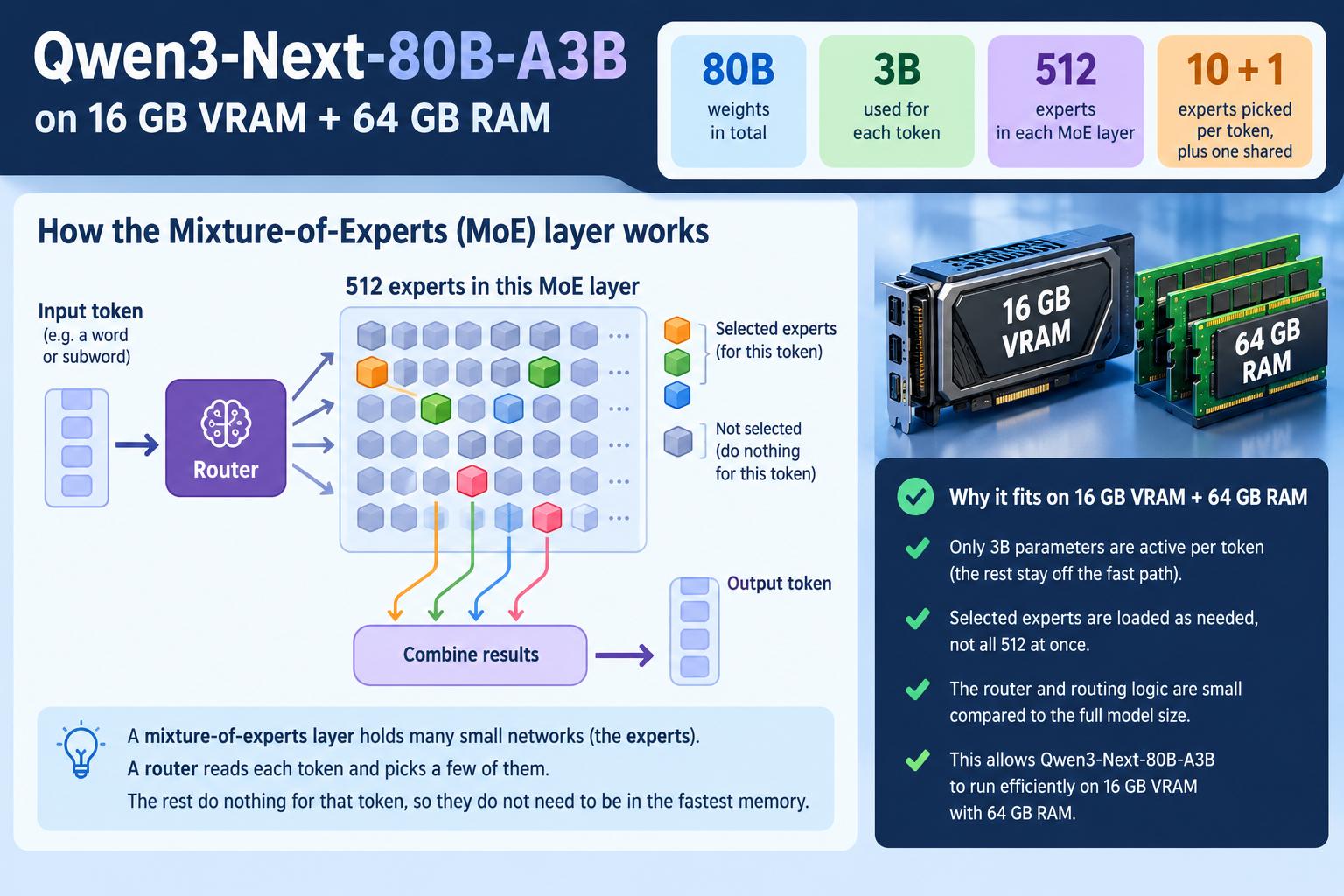
Qwen3-Next-80B-A3B on 16 GB VRAM + 64 GB RAM

Qwen3-Next-80B-A3B on 16 GB VRAM + 64 GB RAM
80Bweights in total
3Bused for each token
512experts in each MoE layer
10 + 1experts picked per token, plus one shared

A mixture-of-experts layer holds many small networks, the experts. A router reads each token and picks a few of them. The rest do nothing for that token, so they do not need to be in the fastest memory.

Three places to keep weights

GPU VRAM, 16 GB
896 GB/s on an RTX 5070 Ti. The GPU reads from here at full speed.
System RAM, 64 GB
Tens of GB/s. Holds what does not fit in VRAM.
NVMe SSD
A few GB/s. Holds the whole model file, so it always has every expert.

Try it: where do the 10 experts live?

One layer is drawn as 512 squares. Change the size of the model file and see how the squares split across the three tiers. Then send a token.

16 GB~48 GB: Q4 file of this model200 GB
in VRAM in RAM on SSD only picked by the router
This token: 1 from VRAM, 9 from RAM, 0 from SSD
25%of experts in VRAM
75%in RAM
0%on SSD only
28.9rough speed ceiling, tokens/s

Illustration, not a measurement. Assumptions: about 12 GB of VRAM and 56 GB of RAM are free for experts, experts are spread evenly, the router picks them at random, and the 3B active weights at 4-bit (about 1.8 GB) are read once per token at 896 GB/s from VRAM, 40 GB/s from RAM and 4 GB/s from the SSD. Real routing is uneven and real programs differ, so treat the speed as an upper bound for the idea, not a forecast.

What to remember

  • A 4-bit copy of this model is about 45 to 50 GB. That fits in 64 GB of RAM, so the SSD is rarely touched.
  • A model larger than RAM must read experts from the SSD again and again. Then the SSD speed sets the token speed.
  • Programs differ. Many, such as llama.cpp, put fixed groups of weights in VRAM and RAM and let the operating system load the rest from disk. Only some move single experts between tiers while running.

The GPU in this example: RTX 5070 Ti

SpecValueWhy it matters here
Video memory16 GB GDDR7The VRAM tier. Anything larger spills into RAM.
Memory bus256-bitTogether with the memory speed, sets the bandwidth.
Memory speed28 Gbps per pin256 bits x 28 Gbps / 8 = 896 GB/s.
Memory bandwidth896 GB/sThe VRAM speed used in the estimate above.
Host linkPCIe 5.0The path between the GPU and system RAM.

Source for the model figures: Qwen3-Next-80B-A3B model card (80B total, 3B active, 512 experts, 10 active, 1 shared).

A Small Throwback to Folding@home

Before crypto, before AI hype, before GPUs became financial instruments, there was a time when spare CPU cycles quietly went to science.

In the early 2000s, whenever I repaired a PC or laptop (which was 99.5% pro bono), I used to do one extra thing:
install Folding@home.

I’d explain to the owner that when their computer was idle, it would donate a tiny bit of electricity and processing power to medical research. Protein folding. Cancer. Alzheimer’s. Real problems. Real science. Electricity was cheap, machines were slow, and nobody expected anything in return – except the quiet satisfaction of contributing.

It wasn’t flashy. There were no tokens, no dashboards promising ROI, no buzzwords. Just a screensaver showing abstract molecules twisting in silence, doing something meaningful while the machine waited.

Fast forward to today. GPUs cost a fortune, watts are measured like fuel, and almost every spare cycle is expected to justify itself financially. And yet… Folding@home is still there. Smaller, quieter, a bit forgotten – but still running. Still doing the work.

I recently stumbled upon my old stats and noticed something funny: I was ranked #1 in my team by points, despite having fewer completed work units. Turns out the system always rewarded impact, not volume. Faster machines, harder simulations, better use of time. That feels oddly consistent with the whole philosophy back then.

No hype. No shortcuts. Just doing the job well.

This isn’t really about idle computing any more.
It’s about a broader shift in mindset.

Back then, the idea that many people could contribute small, invisible pieces toward a shared goal felt natural. There was no expectation of reward, no personal branding, no monetization layer attached to every action. The value was in the collective outcome, not the individual gain.

Today, even our spare resources – time, attention, compute – are framed almost exclusively through profit. If something doesn’t pay, scale, or signal status, it’s often dismissed as naïve or inefficient. In that environment, projects like Folding@home don’t disappear because they stopped mattering, but because the idea of a common, unpaid effort has quietly fallen out of fashion.

Maybe that’s the real loss.
Not idle cycles, but the assumption that doing something together, for no personal return, was once enough.

“As Tolkien wrote, it is often the small, unseen acts of ordinary people that keep the darkness at bay — and perhaps they still can.”

How to calculate the innodb_buffer_pool_size im my.cnf

In order to properly calculate the size of the innodb_buffer_pool_size directive in MySql configuration we need to find the RIBPS.
RIBPS is the : Recommended InnoDB Buffer Pool Size based on all InnoDB Data and Indexes with an additional 60%.

So you fire up an sql session and run the following query :

SELECT CEILING(SUM(data_length+index_length)/POWER(1024,2)) RIBPS FROM information_schema.tables WHERE engine='InnoDB';

The output is the number we are after :


+-------+
| RIBPS |
+-------+
| 5053 |
+-------+

So in the configuration of MySql server (usually in /etc/mysql/my.cnf)
we add the following :


[mysqld]
innodb_buffer_pool_size=5053M

Given the amount of data and index pages for your dataset, having a small Buffer Pool will just cause data and index pages accessed to rotate out and load new pages as needed (like low memory and swap in Linux). Having the Buffer Pool too big would just wastes RAM so its critical to set it just right.

Tip : Use the following query after the mysql db has run for a week or so (or before restarting it, so that you dont have to wait for another week!) to see how many actual pages of InnoDB data reside in the InnoDB Buffer Pool.

SELECT (PagesData*PageSize)/POWER(1024,3) DataGB FROM
(SELECT variable_value PagesData
FROM information_schema.global_status
WHERE variable_name='Innodb_buffer_pool_pages_data') A,
(SELECT variable_value PageSize
FROM information_schema.global_status
WHERE variable_name='Innodb_page_size') B;

Have fun!

The future of SEO – Part I

Yesterday i stumbled across a weird figure of google plus statistics that might become critical in the near future of SEO.

Considering that Google’s Pagerank algorithm increasingly focuses on social signals deriving from various sources, it is becoming clear that we are moving out from traditional link building to social media voting.

Authorship value, now linked  to the web through structured data, will heavily rely on user reviews and will be promoted through search as personalized content. Keywords will be replaced by contexts and keyword research and analysis in SEO will become obsolete, as geotargeting, voice search and social sharing will take search to a level where search queries will no longer be needed.

To be continued…